
How to Deactivate Salik Tag Online and Cancel Account 2026: Complete Guide for Dubai Drivers
If you are a car driver in the UAE, you must have heard about the Salik tag and its importance. A Salik tag is a sticker that contains an electronic chip that can be read by scanners at toll gates. It works in all weather conditions and at all speeds, allowing for accurate and dependable vehicle recognition. It is essential when you cross a toll gate in Dubai. However, there may come a time when you need to deactivate Salik tag online or permanently cancel Salik account – for example, when you sell your car, leave the country, or no longer need the service.
In this comprehensive guide, we will explain how to deactivate Salik tag online, how to cancel Salik account, as well as how to purchase and activate a Salik tag in the first place. We will cover all official methods including the Salik website, Smart Salik app, customer service, and customer happiness centers.
For more helpful guides on driving, tolls, and living in the UAE, visit our main website: https://www.khaleej2uae.com/. Now, let’s dive into the complete process for managing your Salik tag and account.
What is a Salik Tag and Why You Might Need to Deactivate It?
A Salik tag is a small RFID sticker placed on your vehicle’s windshield. Each time you pass under a Salik toll gate in Dubai, the tag is scanned and the toll fee (currently AED 4) is deducted from your Salik account. The tag is linked to your vehicle’s registration.
You may need to deactivate Salik tag online or cancel your account if:
You sell your car.
Your car is stolen or written off.
You are leaving the UAE permanently.
The tag is damaged or not working properly.
You want to transfer the tag to a new vehicle.
How to Purchase Salik Tag Online (Before Activation)
Before you can activate a Salik tag, you must purchase one. Here are the official methods.
Purchase Tag Through Salik Official Website
Visit salik.gov.ae.
Click on “Purchase Salik Tag” under Salik services.
Fill out the vehicle registration information (plate number, emirate, etc.).
Enter your customer information (name, email, mobile number).
You will receive an OTP (One‑Time Password) to verify your mobile number.
Complete the shipping information (address for delivery).
Double‑check all information and make the payment (tag fee + shipping).
Confirm the process. Your Salik tag will be delivered within 5 working days.
Purchase Tag from Petrol Stations and Authorized Banks
You can also buy a Salik tag from:
Petrol stations: Emarat, ENOC, EPPCO, ADNOC.
Authorized banks: Dubai Islamic Bank, Emirates NBD.
Once purchased, you will receive an SMS confirmation of payment and your initial balance. The tag is activated immediately upon receiving this SMS. Follow the instructions to place the tag correctly on your windshield (behind the rearview mirror, away from tinting).
How to Activate Salik Tag Online
If you purchased your Salik tag online, you will need to activate it before use. You will need the following information:
Tag number and key – printed on the back of your Salik tag.
Traffic Code Number (T.C. Number) – found on your vehicle registration card (Mulkiya). This is required for UAE‑registered vehicles.
Steps to Activate Online:
Go to salik.gov.ae.
Under Salik services, select “Activate A Tag”.
Fill in the required information:
Tag number and key
Traffic Code Number
Vehicle registration details
Your personal profile information (name, contact, etc.)
Upload any required documents (e.g., vehicle registration card copy).
Review and confirm the information.
Submit the form.
Alternatively, you can activate your Salik tag through:
Smart Salik app (available on iOS and Android)
Salik customer service call center
Customer happiness centers in Dubai
Once activated, your Salik account will be ready, and tolls will be deducted automatically.
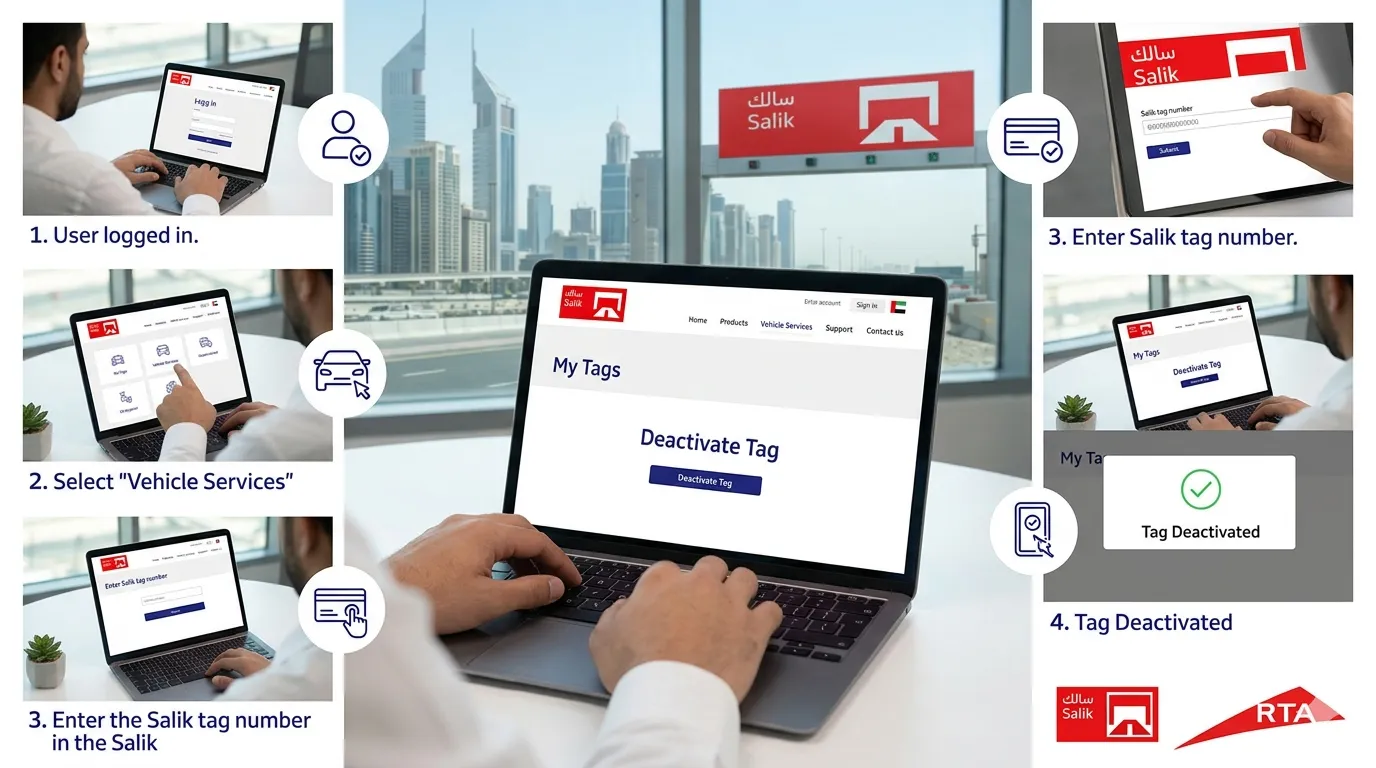
How to Deactivate Salik Tag Online (Step-by-Step)
You must deactivate Salik tag online immediately if the tag is lost, stolen, sold with the car, or damaged. Otherwise, you remain responsible for any tolls incurred by that tag.
Methods to Deactivate Your Salik Tag:
| Method | Details |
|---|---|
| Salik website (salik.gov.ae) | Log in to your account, go to “Manage Tags,” select the tag, and click “Deactivate.” |
| Smart Salik app | Open the app, navigate to “My Tags,” choose the tag, and select “Deactivate.” |
| Call Salik customer service | Dial 800 SALIK (800 72545) and request tag deactivation. |
| Visit a customer happiness center | Go to any Salik customer service center in Dubai (e.g., Al Barsha, Deira). |
Step-by-Step Using the Salik Website:
Log in to your account at salik.gov.ae using your registered email and password.
Go to “My Account” or “Manage Tags”.
You will see a list of tags linked to your account.
Select the tag you wish to deactivate.
Click the “Deactivate” or “Remove” button.
Confirm the action. The tag will be deactivated immediately.
You will receive a confirmation SMS or email.
⚠️ Important: Deactivating a tag does not close your Salik account. Your account remains open with any remaining balance. If you later buy a new car, you can activate a new tag and link it to the same account.
How to Cancel Salik Account Permanently
If you are leaving the UAE permanently and do not plan to use Salik again, you may want to cancel Salik account entirely. Deactivating your tag is not enough – your account will be placed on hold for approximately three years unless you formally close it.
Steps to Cancel Salik Account:
Contact Salik Customer Service by calling 800 SALIK (800 72545).
Request to cancel Salik account permanently.
You will need to verify your identity (Emirates ID, account number, registered mobile number).
Ensure your account balance is zero (no outstanding tolls or negative balance). Any positive balance may be refunded after a processing period.
The customer service agent will process the cancellation. You will receive a confirmation message.
💡 Note: You can also visit a customer happiness center in person to cancel your account. Bring your Emirates ID and vehicle registration documents.
Once your Salik account is cancelled, all linked tags are automatically deactivated. You cannot reverse a cancellation; you would need to open a new account if you return to the UAE.
What Happens to Your Salik Account When You Sell Your Car?
When you sell your car, follow these steps to avoid being charged for the new owner’s tolls:
Deactivate Salik tag online as described above.
Remove the physical Salik tag from the windshield. (Do not leave it on the car.)
Notify Salik customer service of the vehicle sale. They will update your account and remove the vehicle from your profile.
Your Salik account will remain open with the existing balance in case you buy a new car in the future.
If you forget to deactivate Salik tag, you will be charged for every toll the new owner passes through. This can quickly drain your balance.
Important Tips for Deactivating and Canceling
Act quickly – As soon as you sell your car or lose your tag, deactivate it immediately.
Keep proof – Save the deactivation or cancellation confirmation message.
Check your balance – After deactivation, monitor your account for a few days to ensure no further deductions occur.
Refund policy – If you cancel your account and have a positive balance, request a refund. Salik may issue a cheque or transfer to your bank account after a processing fee.
Lost or stolen tag – Report it immediately to avoid liability. You may need to file a police report for stolen tags.
Frequently Asked Questions (FAQs)
Q1: Is there a fee to deactivate Salik tag online?
No. Deactivating a Salik tag is free of charge.
Q2: Can I reactivate a deactivated Salik tag?
No. Once deactivated, a Salik tag cannot be reactivated. You must purchase a new tag.
Q3: How long does it take to deactivate a Salik tag online?
Deactivation is instant through the website or app. You will receive confirmation within minutes.
Q4: Will deactivating my tag close my Salik account?
No. Tag deactivation only stops that specific tag from working. Your Salik account remains open with any remaining balance. To cancel Salik account, you must specifically request closure.
Q5: What is the Salik customer service number?
Call 800 SALIK (800 72545) from within the UAE. For international calls, dial +971 4 313 1111.
Q6: Can I cancel my Salik account online without calling?
Currently, account cancellation requires contacting customer service or visiting a center. The online portal allows tag deactivation but not full account closure.
Q7: What happens to my balance after account cancellation?
If you have a positive balance, Salik will refund it after deducting any applicable fees. The refund process may take 30–60 days.
Q8: Do I need to deactivate my Salik tag if I am leaving the country temporarily?
No. If you plan to return, you can leave the tag and account active. However, if you are selling your car or leaving permanently, deactivate the tag and consider canceling the account.
Final Thoughts
Knowing how to deactivate Salik tag online and how to cancel Salik account is essential for every Dubai driver. Whether you sell your car, lose your tag, or leave the UAE, following the correct steps protects you from unwanted toll charges.
To deactivate a tag: Use the Salik website, Smart Salik app, or call 800 SALIK.
To cancel your account: Contact customer service or visit a happiness center. Ensure your balance is zero.
When selling your car: Deactivate the tag immediately and remove it from the windshield.
For more practical guides on Salik, driving, and living in the UAE, bookmark https://www.khaleej2uae.com/ and check back regularly.
Manage your Salik wisely. Deactivate when needed. Cancel only when permanent.
Disclaimer: This article is for informational purposes only. Fees, procedures, and contact numbers are subject to change by the Salik team and RTA. Always verify current information through the official Salik website (salik.gov.ae) or by calling 800 SALIK before taking action.









