
How To Check Salik Balance Online Without Account Number – Complete 2026 Guide
Dubai has seven Salik toll gates located on major highways and bridges across the city. Every time your registered vehicle passes through one of these gates, a toll fee is deducted from your Salik account. To avoid fines, you need to ensure your account has sufficient funds. But what if you don’t have your account number handy? In this comprehensive guide, we will explain how to check Salik balance online without account number and through other simple methods.
Whether you are a new driver, a visitor, or simply forgot your login credentials, this article will help you check your Salik balance quickly. We will also cover how to check your Salik balance using the official website, mobile apps, and customer service.
For more helpful guides on driving, fines, and living in the UAE, visit our main website: https://www.khaleej2uae.com/. Now, let’s dive into everything you need to know about how to check Salik balance online without account number.
Salik: An Overview
Salik is a road toll system established in Dubai on July 1st, 2007. If you drive in Dubai, you should have at least a basic idea of Salik. The system requires you to pay a fixed fee (AED 4 at the time of writing this article) whenever you pass through certain checkpoints.
You should expect to pay that fee if you drive on major streets like Sheikh Zayed Road, Airport Road, and Garhoud Bridge. One of the payment options for Salik is registering an account and paying with your credit or debit card. You should always ensure that your Salik balance has enough funds to pay your tolls to avoid receiving fines.
How to Check Your Salik Balance (Standard Method)
Now that you understand the importance of topping up your Salik balance, you need to know how to check your Salik balance using the standard online method. Follow these steps:
Go to Salik’s official website at https://www.salik.ae.
Click on “Sign In” and log in using your Traffic File Number (or registered email) and your Salik PIN.
Once signed in, navigate to the “Check My Balance” tab. It is usually located on the dashboard or under the account menu.
Your remaining Salik balance will be displayed on the screen. That’s it – simple and fast.
You can follow these steps using a phone or a personal computer. You may also download the official Smart Salik app from the Google Play Store or Apple App Store. Follow the same sign-in and balance-checking steps. Additionally, you can use the Dubai Drive app (RTA’s unified app) to check your Salik balance after logging in with your RTA credentials.
💡 Pro Tip: Save your login details securely so you can check your Salik balance anytime.
How to Check Salik Balance Without Account Number
As easy as the standard method sounds, it requires your Traffic File Number or account number. But what if you don’t have it? How can you check Salik balance without account number? Don’t worry – there are several ways.
Method 1: Call Salik Customer Service (800 Salik)
The most reliable way to check Salik balance without account number is to call Salik customer service. Follow these steps:
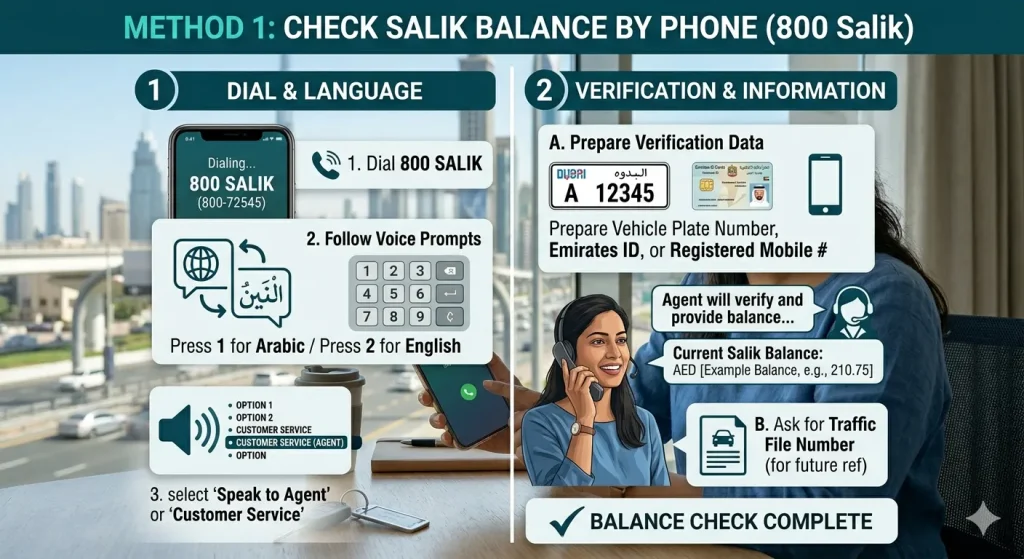
Using your phone, dial 800 Salik (800-72545). You can also dial +971-4-313-1111 if calling from outside the UAE.
You will be directed to an automated voice response system. Press 1 for Arabic language or 2 for English.
After choosing your language, you will be presented with several options:
To check your balance without an account number, you will need to speak to a live agent. Choose the option for “Customer Service” or “Speak to an agent.”
The agent will ask you to verify your identity. Be ready to provide your vehicle plate number, Emirates ID, or registered mobile number.
Once verified, the agent will tell you your Salik balance directly. You can also ask them to provide your Traffic File Number for future reference.
Alternatively, after choosing your language, you can select the option that says “Log in to Salik account” (often option 3). The automated system may then prompt you to enter your registered mobile number or vehicle details to provide your balance without needing the account number.
⚠️ Note: Automated balance checks without an account number may not always be available. Speaking to a live agent is the most reliable method.
Method 2: Use the Dubai Drive App
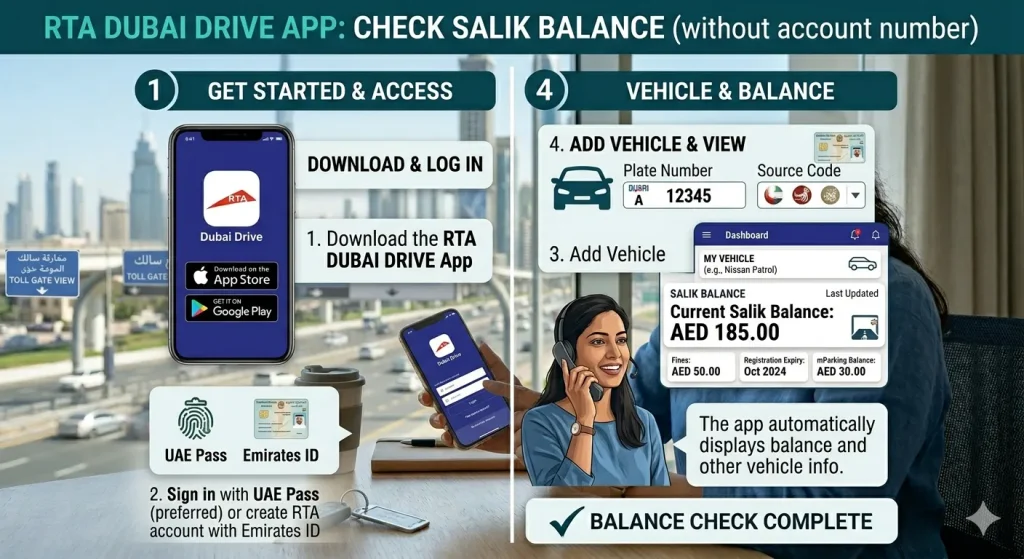
The Dubai Drive app (by RTA) allows you to check your Salik balance without needing your account number, provided you have registered your vehicle with the app. Here’s how:
Download the Dubai Drive app from the App Store or Google Play Store.
Sign in using your UAE Pass or create an RTA account using your Emirates ID and mobile number.
Once logged in, add your vehicle by entering the plate number and source code (e.g., Dubai, Abu Dhabi, etc.).
The app will automatically display your Salik balance along with other vehicle-related information (e.g., fines, registration expiry).
This method requires you to have your vehicle registered with RTA, but it does not require your Salik account number.
Method 3: Visit a Salik Customer Service Center
If you prefer face-to-face assistance, you can visit any Salik customer service center located across Dubai (e.g., at RTA headquarters or certain shopping malls). Bring your Emirates ID and vehicle registration card (Mulkiya). The staff will verify your identity and provide your Salik balance without needing your account number.
Alternative Ways to Check Salik Balance
Even if you don’t have your account number, you can also check your Salik balance through:
Bank Statements: If you have set up automatic top-ups, your bank statement may show your remaining balance after each transaction (though not in real time).
SMS Alerts: Some Salik users receive low-balance SMS alerts. These messages sometimes include your current balance.
Ask a Friend with a Salik Account: If you have a friend who uses Salik online, they cannot check your balance, but you can use their logged-in device to retrieve your account number if you know your registered email or mobile.
The most practical methods remain the customer service hotline and the Dubai Drive app.
FAQs: Common Questions About Salik Balance
Q1: What happens if I don’t have enough balance in my Salik account?
If your account does not have enough balance to pay the checkpoint tolls, you have a grace period of up to 5 days. You should top up your Salik balance before that period ends to avoid a AED 50 fine. If the balance remains insufficient after 5 days, a fine of AED 50 will be deducted. Subsequent violations may lead to higher fines.
Q2: How do I reduce my Salik cost?
You can reduce the amount of money you pay through Salik tolls by taking alternative routes that avoid toll gates. Use the RTA Smart Drive app (available on Android and Apple phones) or Google Maps with “Avoid Tolls” enabled. The app will adjust your commute so you won’t pass through Salik gates.
Q3: Can I set up my account to recharge my balance automatically?
Yes, you can. If your bank allows automatic payments, you may use your credit or debit card to automatically top up your Salik balance when it falls below a certain threshold (e.g., AED 20). This eliminates the possibility of being fined if you forget to check your balance. Log in to your Salik account and enable “Auto Top-Up” under payment settings.
Q4: I have multiple vehicles. Do I need many Salik accounts?
No, you do not. You can only have one Traffic File Number registered to your name. Therefore, you can only have one Salik account regardless of the number of vehicles you own. However, you will need a separate Salik tag for each vehicle, and all tags will be linked to the same account and draw from the same balance.
Q5: Can I check my Salik balance using my Emirates ID only?
Not directly online, but you can call 800 Salik customer service, provide your Emirates ID and vehicle plate number, and the agent will tell you your balance. The Dubai Drive app also works with your Emirates ID after registration.
Q6: Is the Smart Salik app free?
Yes, the official Smart Salik app is free to download and use. You can check your balance, top up, and view transaction history.
The Bottom Line
Knowing how to check Salik balance online without account number is essential for every driver in Dubai. While the standard method requires logging in with your Traffic File Number and PIN, you have several alternatives:
Call 800 Salik (800-72545) and speak to a customer service agent after verifying your identity.
Use the Dubai Drive app – after registering your vehicle, your Salik balance appears automatically.
Visit a Salik service center in person.
Remember to keep your Salik balance topped up to avoid fines. You can also enable auto top-up for peace of mind. For more driving tips, fine information, and practical advice on living in the UAE, bookmark https://www.khaleej2uae.com/ and check back regularly.
Drive smart. Keep your Salik balance healthy. And never worry about fines again.
Disclaimer: This article is for informational purposes only. Salik toll fees, fine amounts, and procedures are subject to change by the Roads and Transport Authority (RTA) of Dubai. Always refer to the official Salik website (www.salik.ae) or contact RTA for the most current information.









